Business Logic & Dataflow
Compact reference for Digital Thai MoCA / BrainDI system behavior.
Actors & Components
| Actor | Component | Purpose |
|---|---|---|
| Clinical staff | Backoffice (braindi-backoffice-frontend) | Create tests, review results, manual grading, PDF export |
| Patient | Patient webapp (automoca-web-app) | Take MoCA test on tablet/browser |
| System workers | automoca-aiservice + global-asr-service | Auto-score sections & transcribe audio (no UI) |
Shared backend: automoca-api-services (braindi-backend).
Test Lifecycle
Key Statuses
| Status | Meaning |
|---|---|
created | Test link exists; patient has not started testing. |
testing | Patient is currently in or has started the test flow. |
predicting | Patient called POST /web/tests/end; test is closed. Backend waits for in-flight AI/ASR results (or cron timeout) before waiting for review. (Some test result still missing, or haven't come back from AI) |
waiting for review | Test is ready for staff review/scoring. |
finished | All required scores are complete with no review required, or staff review is finalized; the result is downloadable. |
Backoffice progress label while a patient is testing
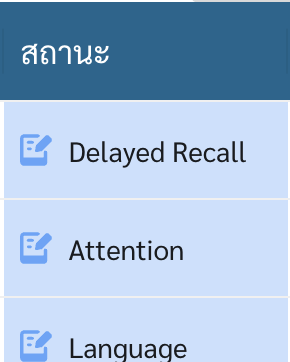
The backoffice progress label is based on the test's latest successfully submitted lastStep while status = testing. It is not a direct report of the patient webapp screen currently open. Consequently, the label intentionally lags behind the patient by one submitted item or domain boundary.
While status = created, the dashboard label is always รอทดสอบ regardless of lastStep.
Progress is persisted in two locations by automoca-api-services:
- MongoDB: root field
lastStepon the test document. Backoffice test records and progress labels use this persisted test data. - Redis: JSON field
last_stepunder keytest:<testId>. Patient token validation and resume routing use this cache record. Progress updates retain the key's existing TTL.
The backend (automoca-api-services) persists lastStep on each successful submit. The backoffice does not compute progress itself; it maps the API's last_step field to a domain label via STEP_TO_CATEGORY in braindi-backoffice-frontend (src/dashboard/constant.ts).
While status = testing, each persisted lastStep maps to a backoffice label as follows:
lastStep (backend) | Backoffice label | When backend sets it |
|---|---|---|
create_test | Visuospatial | Staff creates test (CreateTest). Redis cache also starts here on validate-token for a new session. |
patient_detail | Visuospatial | Patient POST /web/tests (patient detail / consent) |
visuospatial_1 | Visuospatial | PUT /web/tests/visuospatial with test = visuospatial_1 (first submit that sets status = testing) |
visuospatial_2 | Visuospatial | PUT /web/tests/visuospatial with test = visuospatial_2 |
visuospatial_3 | Visuospatial | PUT /web/tests/visuospatial with test = visuospatial_3 |
naming_1 | Naming | PUT /web/tests/naming with test = naming_1 |
naming_2 | Naming | PUT /web/tests/naming with test = naming_2 |
naming_3 | Naming | PUT /web/tests/naming with test = naming_3 |
memory_1 | Memory | PUT /web/tests/memory with test = memory_1 |
memory_2 | Memory | PUT /web/tests/memory with test = memory_2 |
attention_1 | Attention | PUT /web/tests/attention/number with test = attention_1 |
attention_2 | Attention | PUT /web/tests/attention/number with test = attention_2 |
attention_3 | Attention | PUT /web/tests/attention/tap with test = attention_3 |
attention_4 | Attention | PUT /web/tests/attention/subtract with test = attention_4 |
language_1 | Language | PUT /web/tests/language/repeat with test = language_1 |
language_2 | Language | PUT /web/tests/language/repeat with test = language_2 |
language_3 | Language | PUT /web/tests/language/fluency with test = language_3 |
abstraction_1 | Abstraction | PUT /web/tests/abstraction with test = abstraction_1, only after both answers are submitted |
abstraction_2 | Abstraction | PUT /web/tests/abstraction with test = abstraction_2, only after both answers are submitted |
delayed_recall | Delayed Recall | PUT /web/tests/orientation for answers 1–5 (see notes below — not set by delayed-recall endpoints) |
orientation | Orientation | PUT /web/tests/orientation answer 6, when all orientation answers are complete |
end | Orientation | POST /web/tests/end (status becomes predicting immediately; label switches to ประมวลผล) |
After POST /web/tests/end: predicting → ประมวลผล, then waiting for review → รอประเมิน or finished → เสร็จสิ้น.
Implementation-specific progress behavior (verified in submit.test.service.go and acceptance_tests/happy_path.go):
- Abstraction partial submits: a single answer on
abstraction_1orabstraction_2does not updatelastStep. Until both answers for that item are in, the label stays on the previous step (language_3orabstraction_1). - Delayed recall does not advance
lastStep:PUT /web/tests/delayed_recallandPUT /web/tests/delayed_recall/hintnever changelastStep. While the patient is in delayed recall (including hints/MCQ), MongoDBlastStepremainsabstraction_2and the backoffice shows Abstraction. delayed_recallis an orientation-progress marker: the backend setslastStep = delayed_recallon each orientation submit for answers 1–5. The backoffice therefore shows Delayed Recall while the patient is answering orientation questions 1–5, not during the actual delayed-recall section.- Orientation completion: after orientation answer 6,
lastStepbecomesorientation. The patient webapp then immediately callsPOST /web/tests/end, so Orientation is rarely visible as an activetestinglabel. - Patient resume (Redis): while orientation answers 1–5 are in flight, Redis
last_stepstaysdelayed_recall; after answer 6 it becomesorientationuntil/endsetsend.
Auth Model
| Token | Used by | Protects |
|---|---|---|
| Staff bearer | Backoffice | /tests/*, /patients/*, /users/*, /usergroups, /web/tests/generate, /web/tests/staff-update-patient-detail, /web/auth/logout |
| Test bearer | Patient webapp | GET /web/auth/validate-token, /web/tests/* (submit answers, upload files, live speech) |
401 on backoffice → redirect to /login (axios response interceptor).
Staff login (POST /web/auth/login) returns a JWT stored in backoffice local storage. Backend also stores role and accessible organization IDs in a Redis session keyed by user_id. Staff JWTs contain user_id and signed_time (no JWT exp); validation also requires the Redis entry (session_expiration_hour in backend config). Logout (POST /web/auth/logout) deletes that Redis entry.
Patient access uses a separate test JWT embedded in the generated link (?token=). The webapp validates it via GET /web/auth/validate-token, then reuses it as the bearer for /web/tests/*. Test JWTs contain encrypted_id, test_id, and signed_time.
Patient Webapp Test Page Flow (automoca-web-app)
Logical 22-step MoCA sequence (excludes backoffice). The patient webapp has additional intro, tutorial, and retry screens beyond these 22 scored steps.
Scoring runs during the test (per-section Kafka AI and async ASR), not at the thank-you page. POST /web/tests/end only closes the test and sets status = predicting.
Scored total (MoCA): 30 pts — Memory (trials 1–2) is learning only and does not count toward total score. Only delayed recall round 1 (free recall) counts toward MoCA total (0–5 pts).
MoCA Test Domains — Detail
1. Visuospatial / Executive — 5 pts
| Page | Task | Patient action | AI scoring | Points |
|---|---|---|---|---|
| 3 | Trail making | Draw path connecting circles in order | visuospatial_1 — OpenCV path analysis on drawing + stroke coordinates | 0 or 1 |
| 4 | Cube drawing | Copy 3D cube from reference | visuospatial_2 — Gemini multi-score + logistic regression pass/fail | 0 or 1 |
| 5 | Clock drawing (11:10) | Draw clock face with hands | visuospatial_3 — Gemini evaluates 3 components | 1 + 1 + 1 |
Clock sub-scores (visuospatial_3):
score_1— contour closed + circularscore_2— numbers 1–12 completescore_3— hands point to 11 and 2
Photo upload fallback → AI marks unsure, staff must grade manually.
Audio check (page 6) — not scored
| Page | Task | Patient action | Scoring |
|---|---|---|---|
| 6 | Audio check | Confirm can hear doctor's voice (speak any words) | No score — mic/ASR gate only |
Occurs after visuospatial, before naming. Patient must speak so real-time ASR detects words. If nothing is detected, the patient webapp loops between mic-test and retry pages — no skip path. User cannot proceed until ASR succeeds.
2. Naming — 3 pts
| Page | Task | Patient action | AI scoring | Points |
|---|---|---|---|---|
| 7 | สิงโต (lion) | See image → speak name | naming_1 — live WSS transcript match | 0 or 1 |
| 8 | แรด (rhino) | See image → speak name | naming_2 | 0 or 1 |
| 9 | อูฐ (camel) | See image → speak name | naming_3 | 0 or 1 |
Live WSS speech during test; on submit the webapp sends audio plus transcribe_text to PUT /web/tests/naming, and the backend publishes AI scoring immediately (naming_1–naming_3). Naming does not use the async ASR Kafka pipeline.
3. Memory — not scored
Two separate patient screens (memory_1, then memory_2), both via PUT /web/tests/memory with different test values.
| Trial | Patient action | API | Scoring |
|---|---|---|---|
memory_1 | App plays 5 words, patient recalls all 5 | PUT /web/tests/memory | No score |
memory_2 | Second recall of the same 5 words | PUT /web/tests/memory | No score |
Words: หน้า, ผ้าไหม, วัด, มะลิ, สีแดง — same set reappears in Delayed Recall.
Learning phase only. Backoffice may display memory audio/transcripts for review but neither trial adds to MoCA total.
4. Attention — 6 pts
| Page | Task | Patient action | AI / rule scoring | Points |
|---|---|---|---|---|
| 11 | 21854 | Repeat digits forward | attention_1 — transcript match | 0 or 1 |
| 12 | 742 | Repeat digits backward | attention_2 — transcript match | 0 or 1 |
| 13 | Tap-1 (เคาะนิ้ว) | Tap when hearing "1" in digit stream | Rule-based tap detection (29 digits) | 0 or 1 |
| 14 | 100 − 7 | Answer 100 − 7, then keep subtracting 7 until timeout | attention_4 — ASR + Gemini | 0–3 cumulative |
Patient flow: User answers what 100 − 7 is (93), then continues subtracting 7 on each step until the recording times out. The patient webapp does not stop after a fixed number of answers.
Grading: Backoffice scoring uses only the first 5 answers (93 → 86 → 79 → 72 → 65). Additional answers recorded before timeout are stored but not counted toward the MoCA score.
Pages 11 and 12 use real-time WSS speech during the test. Page 14 (100 − 7) uses local recording only (no WSS); attention_4 AI scoring runs on the uploaded audio after submit.
5. Language — 3 pts
| Page | Task | Patient action | AI scoring | Points |
|---|---|---|---|---|
| 15 | จอม | Repeat sentence: ฉันรู้ว่าจอมเป็นคนเดียวที่มาช่วยงานวันนี้ | language_1 | 0 or 1 |
| 16 | แมว | Repeat sentence: แมวมักซ่อนตัวอยู่หลังเก้าอี้เมื่อมีหมาอยู่ในห้อง | language_2 | 0 or 1 |
| 17 | ก.ไก่ | Name words starting with ก within time limit | language_3 — word count + Thai prefix rules | 0 or 1 |
6. Abstraction — 2 pts
| Page | Task | Patient action | AI scoring | Points |
|---|---|---|---|---|
| 18 | รถไฟ + จักรยาน | State similarity (2 audio answers) | abstraction_1 — allowed-answer match | 0 or 1 |
| 19 | ไม้บรรทัด + นาฬิกา | State similarity (2 audio answers) | abstraction_2 — allowed-answer match | 0 or 1 |
7. Delayed Recall — 5 pts
Three phases across multiple patient screens (free recall, then per-word category hints, then per-word multiple choice). Words: หน้า, ผ้าไหม, วัด, มะลิ, สีแดง (same as memory trials).
| Phase | Support | Patient flow | AI task | Counts toward MoCA? |
|---|---|---|---|---|
| 1 — Free recall | ตอบได้เอง | Say all 5 words at once. All correct → skip to orientation; else → phase 2 | delayed_recall_1 | Yes |
| 2 — Category hint | ใบ้หมวดหมู่ | Per missed word: play hint audio → wait for answer. After last missing word: all correct → skip; else → phase 3 | delayed_recall_2 | No |
| 3 — Multiple choice | ตัวเลือก | Per still-wrong word: MCQ via audio → answer. Always proceeds to orientation even if words remain wrong | delayed_recall_3 | No |
MoCA scoring (round 1 only):
- AI scores each word 0 or 1 (
score_1–score_5) by matching allowed answers in the transcript. - Round 1: single transcript checked for all 5 words. Rounds 2/3: per-word transcripts.
- MoCA total uses
delayed_recall_1only (sum of 5 word scores, 0–5 pts). Backendscore.Totaland backoffice grader both use round 1. - Rounds 2 and 3 are stored for staff review but do not change MoCA total.
Siriraj auxiliary metric (MisTotal): 3×DR1 + 2×DR2 + DR3 — exported separately, not used in MoCA total. DR2/DR3 scores cascade: only words still wrong from the prior round are counted.
8. Orientation — 6 pts
| # | Question | Patient action | AI task | Points |
|---|---|---|---|---|
| 1 | วันนี้วันที่เท่าไร | Speak answer | orientation_1 | 0 or 1 |
| 2 | เดือนนี้เดือนอะไร | Speak answer | orientation_2 | 0 or 1 |
| 3 | ปีนี้ปีพ.ศ.อะไร | Speak answer | orientation_3 | 0 or 1 |
| 4 | วันนี้วันอะไร | Speak answer | orientation_4 | 0 or 1 |
| 5 | ที่นี่ที่ไหน | Speak answer | orientation_5 | 0 or 1 |
| 6 | จังหวัดอะไร | Speak answer | orientation_6 | 0 or 1 |
Ground truth from test end timestamp + patient geolocation.
MoCA score summary
| Domain | Max pts | Counts toward total? |
|---|---|---|
| Visuospatial | 5 | Yes |
| Naming | 3 | Yes |
| Memory | — | No (learning only) |
| Attention | 6 | Yes |
| Language | 3 | Yes |
| Abstraction | 2 | Yes |
| Delayed Recall | 5 | Yes (round 1 free recall only) |
| Orientation | 6 | Yes |
| Total | 30 |
MoCA System Flow
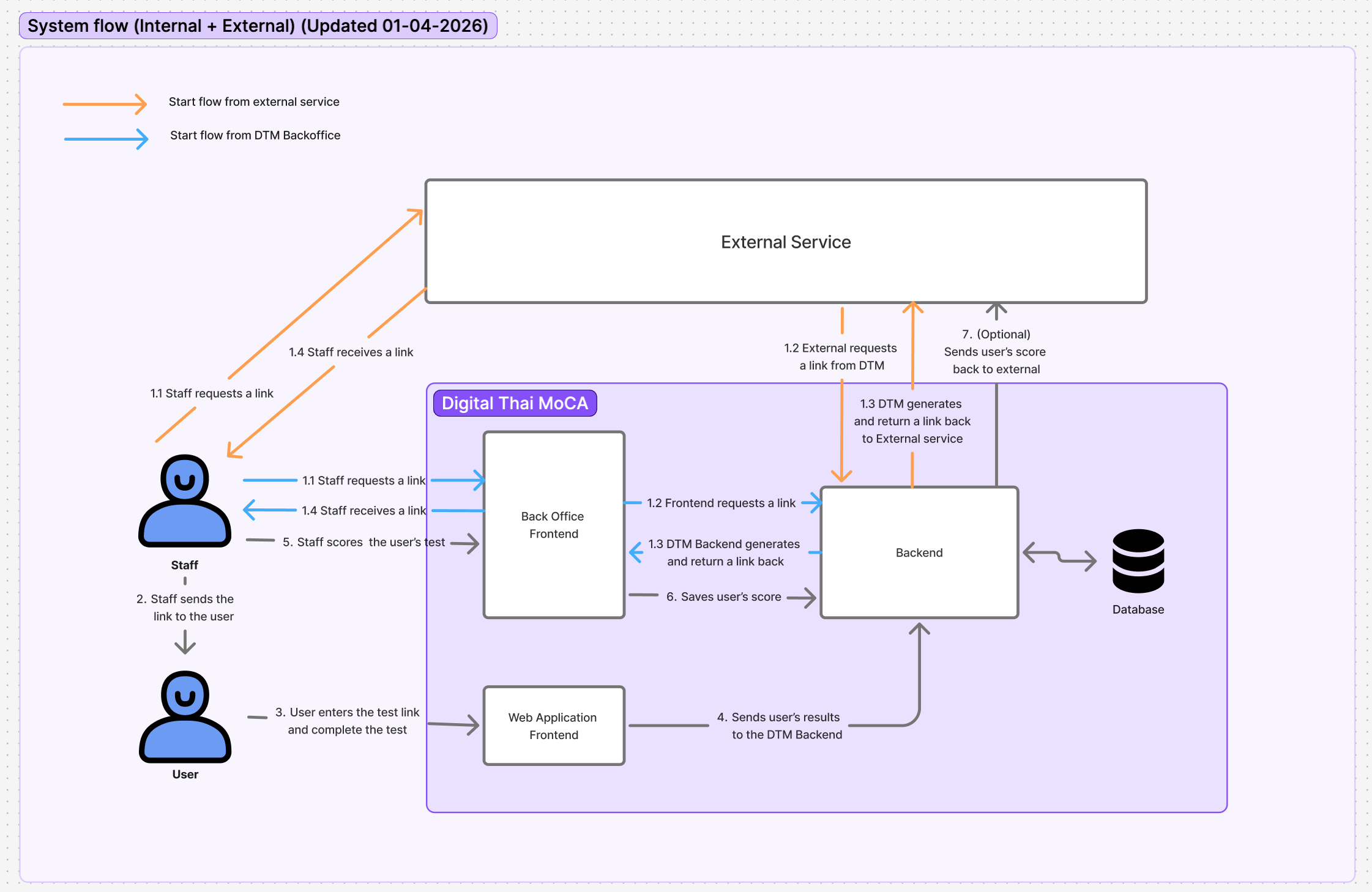
Patient Webapp Test Flow (automoca-web-app)
AI Scoring Tasks
automoca-aiservice routes Kafka messages by type:
| Group | Task types |
|---|---|
| Visuospatial | visuospatial_1, visuospatial_2, visuospatial_3 |
| Naming | naming_1, naming_2, naming_3 |
| Attention | attention_1, attention_2, attention_4 (attention_3 tap-1 is rule-based in backend only) |
| Language | language_1, language_2, language_3 |
| Abstraction | abstraction_1, abstraction_2 |
| Delayed recall | delayed_recall_1, delayed_recall_2, delayed_recall_3 |
| Orientation | orientation_1 … orientation_6 |
Each task reads media from S3, runs scorer (rules / Gemini / ResNet), returns score payload via Kafka.
Staff Backoffice Flow (braindi-backoffice-frontend)
Backoffice grading modules: attention, naming, memory, visuospatial, language, abstraction, delayed-recall, orientation.
Staff can override AI scores per section. When the last unreviewed section is confirmed, backoffice calls POST /tests/score with all section data to persist the final total and set status = finished.
Backoffice Roles & Access Control
The system uses three technical role values. The backoffice displays different labels for two of them:
| Backoffice label | Technical role | Primary scope |
|---|---|---|
| Creator | user | Tests created by that account in its primary organization |
| Admin | admin | Tests and users in the Admin's assigned organizations |
| Organizer | superuser | All organizations |
Each staff account has one primary usergroupId. An Admin may also have accessibleUsergroupIds for additional organizations. The primary organization is always included in the effective access list. Admin accounts without additional IDs, including legacy accounts, fall back to their primary organization.
Organization selection
- Creator: no organization selector; the dashboard and generated tests use the account's primary organization.
- Admin with one organization: no organization selector; the primary organization is used.
- Admin with multiple organizations: the organization selector lists only assigned organizations.
- Organizer: the selector lists all organizations and is always shown; defaults to the account's primary organization when the URL has no org filter.
- The backoffice dashboard displays one organization at a time. Admin requests without an organization default to the primary organization. The backend permits Organizer test search without an organization filter.
- Only Organizer can replace an Admin's additional organization access through the API. That operation preserves the primary organization and refreshes an active Redis session immediately.
Test and backoffice capabilities
Unless a row says otherwise, “own” means a test whose stored creator user ID matches the logged-in account, and “assigned” means the test's organization is in the Admin's effective access list.
| Capability | Creator (user) | Admin (admin) | Organizer (superuser) |
|---|---|---|---|
| Log in to backoffice | Yes | Yes | Yes |
| List organizations | Primary only | Assigned organizations | All organizations |
| Generate a test link | Primary organization | Selected assigned organization | Selected organization |
| Search dashboard tests | Own only | Selected assigned organization | Selected organization in UI; any/all through API |
| Open a result | Own only | Assigned organizations | Any |
| Download test media | Own only | Assigned organizations | Any |
| Review and override scores | Own only | Assigned organizations | Any |
| Edit patient demographics | Own only | Assigned organizations | Any |
| Edit result-page note in UI | No | Yes, except when the Admin's primary organization is Siriraj | Yes |
| Update note through API | Own only | Assigned organizations | Any |
| Generate/download PDF | Own only | Assigned organizations | Any |
| Delete test | No | Assigned organizations except Siriraj | Any, including Siriraj |
Creator ownership remains the access boundary throughout the test lifecycle. A Creator cannot open or modify another Creator's test even when both accounts have the same primary organization. Admin access is organization-based and is not limited to tests created by that Admin.
The dashboard result action ("ตรวจ") is available only when the test is waiting for review or finished. The /result/:id route itself has no status guard — direct URL access still loads the page.
Siriraj behavior
Siriraj is the only organization with explicit role/action exceptions in the current implementation:
- The backoffice hides manual test-link generation whenever Siriraj is selected, for every role. The test-creation API has no equivalent Siriraj-specific check and otherwise applies the normal role scope.
- Creator cannot delete any test. Admin cannot delete a Siriraj test, enforced by the backend even when Siriraj is assigned to that Admin. Organizer can delete a Siriraj test.
- Result-page note editing checks the Admin's primary organization, not the result's organization. A primary-Siriraj Admin cannot edit notes in the UI. A multi-organization Admin whose primary organization is not Siriraj can edit a Siriraj note in the UI. The backend note-update endpoint applies normal assigned-organization access and has no Siriraj-specific note rule.
- Other patient fields remain editable for a role that can access the result.
- Scoring a Siriraj test automatically generates and submits its result to the Siriraj integration. Changing education on an already finished Siriraj test also triggers resubmission.
User and organization management APIs
There is no user-management screen in braindi-backoffice-frontend. The following routes are active in automoca-api-services and require a staff bearer token:
| Method and runtime path | Current authorization |
|---|---|
POST /users | Creator denied. Admin may create only Creator accounts in assigned organizations. Organizer may create Creator or Admin accounts, but not Organizer accounts. Additional accessible organizations are accepted only when the new account is an Admin. |
GET /users/:id | Creator may read self. Admin may read users in assigned organizations. Organizer may read any user. |
PUT /users | Creator may target self. Admin may target users whose primary organization matches the Admin's primary organization. Organizer may target any user. Accepted mutable fields are username, password, first name, last name, and phone number. |
GET /users/usergroup/:usergroup_id | Creator receives only self for the primary organization. Admin may list users in an assigned organization. Organizer may list users in any organization. |
PUT /users/:id/accessible-usergroups | Organizer only; target must be an Admin. Replaces additional organization access while retaining the Admin's primary organization. |
POST /usergroups | Organizer only; creates an organization/usergroup. |
GET /usergroups | Creator receives the primary organization, Admin receives assigned organizations, and Organizer receives all organizations. |
Current operations update staff information for every role directly in MongoDB rather than through a backoffice screen. Staff offboarding is also a manual operations/database process.
The active management APIs do not provide operations to:
- create another Organizer account;
- delete, deactivate, reactivate, or lock a staff account;
- change an account's role, email, or primary organization;
- administratively revoke a staff session;
- rename or delete an organization.
Manual database changes do not automatically refresh or delete an existing Redis session. The cached role and organization access remain in use until the cache expires, the user logs out, or operations remove/update the Redis entry.
Authorization implementation facts
- Backoffice route components do not have role-specific route guards. UI controls are conditionally displayed, while staff API endpoints apply their own backend authorization checks.
PUT /patientsandGET /patients/tests/:idrequire a valid staff bearer token but do not apply role, creator, or organization checks in the patient service.- The staff route
POST /tests/filesis not usable with a staff bearer token —UploadFilerequires test bearer context (test_id,encrypted_id). Patient uploads usePOST /web/tests/files. - Tests retain the creating user ID and username, but the system has no structured audit history recording which staff account later changed scores or patient data, generated a PDF, or deleted a test.
Core Data Entities
MongoDB collections used by automoca-api-services:
| Collection | Go model | Purpose |
|---|---|---|
usergroups | Usergroup | Organization / clinic |
users | User | Staff accounts |
tests | Test | One MoCA session (demographics + all scores) |
patients | Patient | Links encryptedId to related test IDs only |
Test media (audio, images, drawings, PDFs) are stored in S3 under {testId}/{filename}. The test document stores path references inside embedded section data fields — there is no separate files collection.
Demographics and session context are stored on tests, not patients. The PATIENT collection is only an encryptedId → tests[] index. Education appears twice on a test document: as root field education (enum used by APIs/UI) and inside result.education / predictResult.education (scoring shape), both written together on POST /web/tests patient-detail submit.
encryptedId is duplicated on patients and tests (same string, no FK). DTM backoffice link generation sets encryptedId = "backoffice-generated" for all tests; Siriraj passes a real per-patient id from the external system.
Entity summaries
| Entity | Description |
|---|---|
| Usergroup | Organization record. Primary identifier in APIs is organization (display name), not a separate name field. |
| User | Staff account (user, admin, or superuser). One primary usergroupId; Admins may have additional accessibleUsergroupIds. |
| Patient | Lightweight index: encryptedId plus tests[] (ObjectIds). Created/updated when a test link is generated or a patient session starts. Does not store demographics. |
| Test | One MoCA session. Holds patient demographics (dateOfBirth, education, sex, location, province, note, …), workflow fields (status, lastStep, endTestTime), staff context (userId, usergroupId, username), patient link (encryptedId), and two embedded result trees. Soft-deleted via deletedAt. |
Embedded section results (result and predictResult)
There is no section_scores table. Each test document embeds a TestResult object twice:
| Field | Written by | Used for |
|---|---|---|
predictResult | Patient submits, AI consumers, async ASR callbacks | AI predictions and in-flight scoring |
result | Staff review (POST /tests/score) and some rule-based submits | Staff-confirmed / final values shown in backoffice and PDF |
Both trees share the same shape (TestResult in test/entity/test-result.model.go). Top-level score is the total MoCA points (0–30). Cognitive level (NORMAL / MCI / AD) is derived from that total at read time (IntToScoreLevel) — it is not stored on the test document.
Per-item keys inside result / predictResult (22 MoCA items + education):
visuospatial_1–visuospatial_3, naming_1–naming_3, memory_1–memory_2, attention_1–attention_4, language_1–language_3, abstraction_1–abstraction_2, delayed_recall_1–delayed_recall_3, orientation, education
Each item object has:
scores— per-question points and flags (score_1,unsure_1,is_confirmed_1, …; shape varies by item)data— submitted answers (audio filename, image, drawing path, tap sequence, geolocation, transcript text, …)
Staff review updates result.*; predictResult retains what the AI pipeline produced unless overwritten by the same submit path.
Redis caches (not MongoDB)
| Key pattern | Contents |
|---|---|
test:<testId> | Patient session: encrypted_id, last_step (resume routing) |
| User session cache | Staff JWT session: role, accessible usergroup IDs |
Score Interpretation
Backoffice maps total score to cognitive level:
| Level | Meaning |
|---|---|
AD | Alzheimer's disease range |
MCI | Mild cognitive impairment |
NORMAL | Normal range |
Education level (Thai labels in UI) adjusts clinical context for staff review.
Async vs Real-Time Processing
| When | What runs | Examples |
|---|---|---|
| During test (WSS) | Real-time ASR for patient UX | Naming, memory, attention 1–2, language repeat, delayed-recall hints |
| During test (Kafka AI) | Section scoring on submit | Visuospatial, naming, attention 1/2/4, delayed recall |
| During test (Kafka async ASR → AI) | Transcribe then score | Language repeat/fluency, abstraction, orientation |
| During test (local rules) | Immediate backend scoring | Memory, attention 3 (tap-1) |
At /end | Close test only | Sets predicting; does not start new Kafka jobs |
Cron job monitors delayed AI predictions → SNS alarm if threshold exceeded.
Multi-Brand Behavior
Same backend serves multiple frontends (DTM, BrainDI, Siriraj) via configured frontend URLs. Business logic is shared; branding and domain differ per deployment.